Thursday, February 17, 2011

Remove ’s while exporting excel file using RenderControl method of GridView or DataGrid or DataList control.

Example: ‘Employee’s home’ was coming like ‘Employee’s home’ while exporting to excel file where it should come like the original one.

Code Snippet:
Function  ExportToExcel( GridView  gv)
{
HttpContext.Current.Response.Clear();
            HttpContext.Current.Response.AddHeader("content-disposition", string.Format("attachment; filename={0}", "Test.xls"));
            HttpContext.Current.Response.ContentType = "application/ms-excel";


            System.IO.StringWriter oStringWriter = new System.IO.StringWriter();

            System.Web.UI.HtmlTextWriter oHtmlTextWriter = new System.Web.UI.HtmlTextWriter(oStringWriter);

           
            gv.RenderControl(oHtmlTextWriter);

 // add the below marked line to fix that issue
            HttpContext.Current.Response.ContentEncoding = Encoding.GetEncoding("Windows-1252");

            HttpContext.Current.Response.Write(strHeading + oStringWriter.ToString());

            HttpContext.Current.Response.End();

}

Tuesday, October 5, 2010

Sign-in as different user using windows authentication in SharePoint

You can add an hyperlink to your page and href value should be '/_layouts/AccessDenied.aspx?loginasanotheruser=true'. Please see the below example.

<a href='/_layouts/AccessDenied.aspx?loginasanotheruser=true' >Sign in as different user</a>

Check it out and let me know.

Wednesday, September 15, 2010

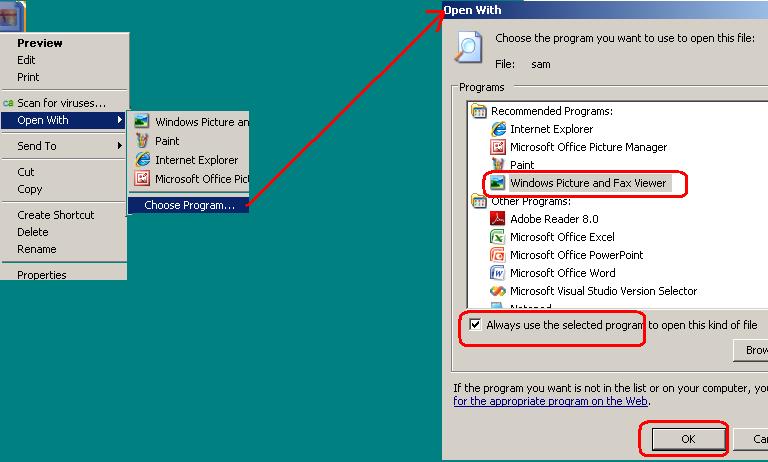
How to open a .TIF file in SharePoint site ?

Normally if you upload a .TIF file to a document library and try to open that, it shows the dialogue box where you will see 'Find' option instead opening the file. For that you have to do some minor setting in your computer.

Step 1: Select any .TIF file and right-click and select 'open with' option.

Step 2: Select Windows Picture and Fax Viewer.

Step 3: Select the checkbox for opening this kind of programs always.

Step 4: Click OK.

Step 5: Open that .TIF file from SharePoint site, you can able to see that.

Image:

Wednesday, August 25, 2010

Enable rating feature for Document library in SharePoint 2010

Step 1: Go to the library settings of the document library.


Step 2: Click on 'Rating Settings' link of the document library.


Step 3: Click 'Yes' to enable rating feature for the document library.

Tuesday, April 20, 2010

Template ID of SharePoint Libraries and Lists

T-ID Description
100 Custom List
1200 Administrator tasks list
104 Announcements list
303 Blog Categories list
302 Blog Comments list
301 Blog Posts list
105 Contacts list
120 Custom grid for a list
118 Custom Workflow Process
130 Data Connection library
110 Data sources
108 Discussion board
101 Document library
106 Events list
150 Gantt Tasks list
100 Generic list
1100 Issue tracking
103 Links list
114 List template gallery
116 Master pages gallery
201 Meeting Agenda list
202 Meeting Attendees list
204 Meeting Decisions list
207 Meeting Objectives list
200 Meeting Series list
210 Meeting text box
211 Meeting Things To Bring list
212 Meeting Workspace Pages list
117 No-Code Workflows
2002 Personal document library
109 Picture library
300 Portal Sites list
2003 Private document library
111 Site template gallery
102 Survey
107 Tasks list
112 User Information list
113 Web Part gallery
119 Wiki Page library
140 Workflow History
115 XML Form library

Tuesday, March 30, 2010

Breakroleinheritance takes a long time to excute.

This is an issue in SharePoint Service Pack 1 and hotfix is available here http://support.microsoft.com/kb/941422


http://support.microsoft.com/kb/941422

Or you can upgrade to SharePoint SP 2.